

















Passwd takes a somewhat different approach to business password management than many of the other platforms I’ve reviewed.
Instead of trying to support every possible identity ecosystem, Passwd is built specifically around Google Workspace. That makes it a strong fit for organizations that already use Google Workspace for identity and collaboration. Its native integration can also simplify administration by allowing IT teams to work with existing Workspace users and Google Groups rather than rebuilding those structures in a separate platform.
After reviewing Passwd’s features, security, pricing, documentation, and customer feedback, I found that simplicity is one of its biggest strengths. Passwd covers the core capabilities I expect from a modern business password manager while also supporting TOTP codes, passkeys, and password health monitoring. Its Enterprise plan gives organizations greater control by allowing them to run Passwd within their own Google Cloud environment.
That combination of focus and simplicity makes Passwd an interesting option, but whether it is the right fit depends heavily on how your organization manages its users, credentials, and security infrastructure.
What you need to know about Passwd

| Best for | Google Workspace-centric organizations |
| Overall score | 4.6/5 |
| Free option | Starter plan |
| Paid pricing | Passwd offers several pricing models, including a Pay-Per-User plan for Professional that starts at $4 per user/month, or a Pay-per-Organization plan for Professional that starts at $19/month for organizations with 2–10 Workspace users. Enterprise-level pricing starts at $6 per user/month on the Pay-Per-User plan and $39/month for organizations with 2–10 Workspace users on the Pay-Per-Organization plan. |
| Google Workspace integration | Yes |
| Passkey support | Yes |
| TOTP support | Yes |
| Browser extensions | Extensions available for Chrome, Firefox, Safari, and Edge |
| Mobile apps | Android and iOS |
| Private cloud deployment | Enterprise plan |
| Public API | Yes |
| Best feature | Native Google Workspace integration |
Passwd offers several pricing models, including a Pay-Per-User plan for Professional that starts at $4 per user/month, or a Pay-per-Organization plan for Professional that starts at $19/month for organizations with 2–10 Workspace users.
Enterprise-level pricing starts at $6 per user/month on the Pay-Per-User plan and $39/month for organizations with 2–10 Workspace users on the Pay-Per-Organization plan.
Overall score: 4.6/5
- Core features: 4.8/5
- Extra features: 4.3/5
- Usability and administration: 4.8/5
- Security: 4.4/5
- Pricing and transparency: 4.8/5
- Customer support: 4.3/5
Pros
- Excellent Google Workspace integration: Passwd synchronizes users and Google Groups, reducing administrative work for organizations already standardized on Google Workspace.
- Straightforward pricing: Organizations can pay per active Passwd user or select organization-wide pricing based on their total number of Google Workspace users.
- Strong sharing capabilities: Passwd gives teams granular control over shared credentials, including support for temporary access, shared TOTP codes, and passkeys.
Cons
- Google-centric by design: The native Google Workspace integration is an advantage for Google customers but makes Passwd less compelling for organizations centered on another identity ecosystem.
- Some advanced controls require Enterprise plans: Audit logging and private Google Cloud deployment are Enterprise features rather than capabilities included across all paid plans.
- Some users report performance and autofill issues: a small number of G2 reviews noted slow performance and autofill issues.
Who should use Passwd?
I think Passwd makes the most sense for small and midsize organizations that already use Google Workspace as the foundation of their identity environment.
The Google Workspace integration goes beyond authentication. Passwd synchronizes Google Workspace users and groups, allowing administrators to use existing groups when controlling access to credentials. That can reduce the amount of duplicate user administration required when deploying a password manager.
It is also a good fit for teams that frequently share access to business accounts. Passwd provides Editor, Viewer, Autofill Only, and Passkey Only roles. Passkey Only is interesting because employees can authenticate through the browser extension without being able to view the password or save the passkey to their device.
Larger Google-centric organizations should look more closely at Enterprise. Passwd deploys the Enterprise version into the customer’s private Google Cloud project, giving the organization greater control over infrastructure, data residency, and encryption keys.
Who shouldn’t use Passwd?
I would look elsewhere if Google Workspace is not central to your organization’s identity strategy. Passwd is designed specifically around Google Workspace, so organizations built primarily around Microsoft Entra ID or another identity provider may be better served by a password manager designed for those environments.
Security teams looking for a mature ecosystem of enterprise integrations should also compare Passwd carefully with other competitors. Passwd now offers a public API for working with credentials through CI/CD pipelines or internal tools, but some competitors offer broader built-in integrations with SIEM platforms, identity providers, and enterprise security products.
Organizations that need detailed audit capabilities should also pay attention to plan selection. Passwd’s audit log is an Enterprise capability, and administrators access those logs through the Google Cloud environment.
Passwd pricing
One area where Passwd impressed me is pricing flexibility.
There is a free Starter plan, while Professional and Enterprise customers can choose between per-user and organization-wide billing. Professional costs $4 per active user per month on the per-user plan, while Enterprise costs $6 per active user per month.
Passwd offers organization-wide pricing as well. These prices are based on the organization’s total number of Google Workspace users rather than the number actively using Passwd. Organizations that only want to deploy Passwd to selected employees can use per-seat pricing instead. Passwd also allows customers to switch between the two pricing models later.
| Google Workspace users | Professional (per month) | Enterprise (per month) |
|---|---|---|
| 2–10 | $19 | $39 |
| 11–20 | $49 | $69 |
| 21–50 | $79 | $109 |
| 51–100 | $139 | $189 |
| 101–300 | $239 | $329 |
| 301+ | $499 | $699 |
I like this approach because it gives IT teams two very different deployment options. A company testing Passwd with its IT department could pay per user, while an organization deploying password management company-wide could potentially lower its effective per-user cost with organization-wide pricing.
The free Starter plan offers another way to evaluate the product, though it has fewer features than the paid versions. Professional adds unlimited records and sharing, while Enterprise adds capabilities such as private cloud deployment and audit logging.
5 key features of Passwd
1. Google Workspace integration
Google Workspace integration is central to how Passwd works. Users can authenticate using their Google accounts, while administrators can synchronize Google Workspace users and groups rather than recreating their organizational structure inside a separate password management platform.
For organizations heavily invested in Google Workspace, I see real administrative value here. Password management becomes an extension of the identity structure IT already maintains, rather than another directory that requires constant attention.
2. Team credential sharing and access controls
Passwd is clearly designed around shared business credentials rather than simply giving each employee a private password vault.
Administrators can grant access to individual users or Google Groups and determine the level of access those users receive. The available roles range from full editing privileges to more restrictive options designed around autofill or passkey access.
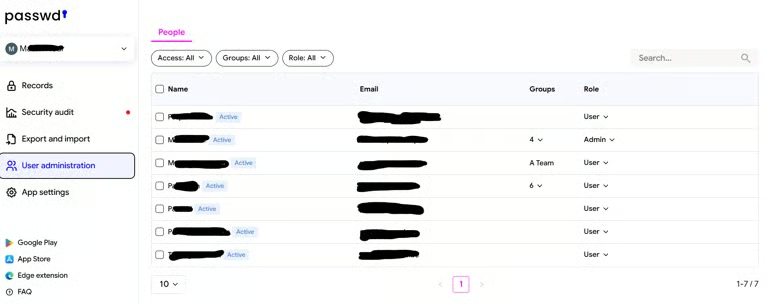
Passwd also supports temporary sharing, which is useful when credentials need to be provided to someone for a limited period.
3. TOTP and passkey support
Passwd can store TOTP information and generate the one-time codes needed for shared accounts. This can solve a common problem for teams where multiple employees need access to an account protected by two-factor authentication.
Passkey support gives organizations another option. Passwd allows teams to store and share passkeys and revoke a colleague’s access when it is no longer required.
Support for TOTP codes and passkeys also helps Passwd keep pace as organizations move beyond password-only authentication.
4. Security audit
Passwd’s security audit evaluates credential health and identifies potentially weak passwords. It looks at factors such as password strength and age, and checks passwords against known leaked credentials.
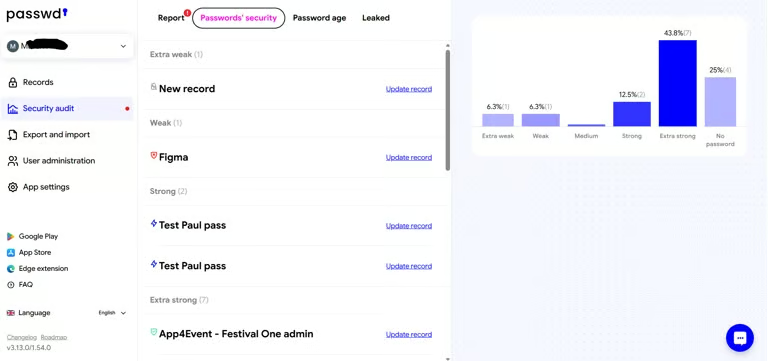
For compromised-password detection, Passwd creates password fingerprints using hashing and compares them against leak data through the Have I Been Pwned API. Password strength evaluation occurs locally within the customer’s Passwd environment.
These capabilities give administrators additional visibility into weak or compromised credentials.
5. Private Google Cloud deployment
Enterprise customers can deploy Passwd into their own Google Cloud project rather than relying on Passwd’s managed SaaS environment.
Passwd states information is encrypted using Google Cloud Key Management Service, while Enterprise customers retain control over their encryption keys and can select where their data is stored.
I see this as one of Passwd’s strongest enterprise differentiators. Organizations with data residency or infrastructure control requirements can keep the password manager within their own environment rather than handing over the entire credential repository to another SaaS provider.
Passwd ease of use
Passwd is available through a web application, with mobile apps for Android and iOS. Browser extensions are available for Chrome, Firefox, Edge, and now Safari. The Safari extension is included with Professional and Enterprise plans, while Starter users can access it free for 30 days. The mobile apps support PIN or biometric authentication as well as native autofill.
Google Workspace integration also removes some of the administrative work that normally accompanies a business password manager. Existing users and Google Groups can serve as the foundation for access management, rather than requiring administrators to rebuild those structures.
That assessment is supported by customer feedback. Ease of use and simple setup were among the most common strengths cited in online reviews of Passwd. Reviewers frequently describe the interface as simple or intuitive and highlight its Google Workspace integration and credential-sharing capabilities.
However, some reviewers reported longer loading times with large numbers of records, occasional Chrome autofill issues, and difficulty autofilling when multiple accounts are available.
Passwd customer service
Passwd provides documentation covering installation, administration, billing, browser extensions, mobile apps, security features, and other product capabilities. Customers can also contact the company through live chat or email.
Professional customers receive online support, while Enterprise customers receive priority support.
Online reviews highlight Passwd’s responsive and helpful customer support. One reviewer also noted the company’s willingness to address feature requests and improve the product.
I scored Passwd slightly lower here because its published support structure is less extensive than that of some competitors, which offer clearly documented 24/7 enterprise support programs and dedicated customer success options. Still, the customer feedback I reviewed generally reflects positively on the quality and responsiveness of Passwd’s team.
Passwd alternatives
Passwd won’t be the right fit for every organization, especially those outside the Google Workspace ecosystem. Here are three alternatives I would consider depending on your organization’s needs.
Proton Pass for Business

Proton Pass for Business is worth considering for organizations that want broader identity integrations and privacy features beyond Passwd’s Google Workspace-focused approach.
Proton offers Pass Essentials and Pass Professional business tiers. Essentials covers core password management and secure sharing while adding features such as dark web monitoring and hide-my-email aliases. Professional expands those capabilities with SSO and SCIM, along with additional tools for enterprise administration and security integrations.
I would consider Proton Pass for organizations that want password management to be part of a broader privacy-focused ecosystem. Proton offers several other business privacy and productivity tools, which could make it attractive to companies looking beyond password management alone.
LastPass Business

LastPass Business is an alternative for organizations that want broader enterprise identity integrations and administrative controls.
The platform combines encrypted vaults and credential sharing with broader administrative capabilities, including dark web monitoring and more than 100 security policies.
LastPass also supports several major enterprise directories and identity providers, including Microsoft Entra ID and Google Workspace. SIEM integrations are available for platforms including Splunk and Microsoft Sentinel.
Enpass Business

Enpass Business is another alternative for organizations that want a password manager designed to work across both Microsoft 365 and Google Workspace environments.
It supports storage within Microsoft 365 or Google Workspace rather than requiring organizations to store their vault data on Enpass’s cloud infrastructure.
Enpass also provides enterprise administration and policy controls, with support for SSO and SCIM provisioning. Organizations can also connect it with SIEM platforms and use its security audit capabilities to monitor credential risks. Business customers receive 24/7/365 technical support.
How I evaluated Passwd
To evaluate Passwd as a business password manager, I analyzed it across six individually weighted categories. I based my evaluation on Passwd’s published materials and supplemented it with a review of a demo environment the company provided. I also examined G2 feedback to compare the company’s product claims with users’ reported experiences.
I weighted each category based on what I consider most important when an organization selects a password manager.
Because I did not conduct a long-term enterprise deployment of Passwd, I gave greater weight to capabilities I could verify through documentation, the demo environment, and user feedback.
Evaluation criteria
Core features (25%): I evaluated how Passwd handles credential storage, autofill, and password generation. I also considered its sharing and access controls, as well as support for TOTP codes and passkeys. Browser and mobile support factored into the score as well. Passwd covers most of the core capabilities I expect from a modern team password manager.
Extra features (20%): I looked beyond basic password management to capabilities such as temporary sharing and security auditing. I also considered public API access and team-designed controls. Private cloud deployment and audit logging were also factored into the evaluation. Passwd performs well here, although some advanced capabilities are limited to Enterprise, and its integration ecosystem is less extensive than that of some competitors.
Usability and administration (15%): I evaluated Passwd’s deployment process and Google Workspace synchronization. I also considered group management, browser support, and mobile applications. Product documentation and reported user experience also factored into the score. G2 feedback consistently highlighted Passwd’s simplicity and ease of setup, although some reviewers report occasional autofill or performance issues.
Security (15%): I examined Passwd’s encryption and authentication options. I also evaluated its credential health monitoring and access controls. Passkey support and audit capabilities factored into the score as well. I also considered Passwd’s private cloud deployment and the depth of its available security information. Enterprise customers gain strong infrastructure control by deploying to their own Google Cloud environment.
Pricing and transparency (15%): I compared Passwd’s paid plans with the broader business password management market. I also considered its free option and published pricing. Billing flexibility factored into the score, including the ability to switch between seat-based and organization-wide pricing. Its $4 per-user Professional plan is competitive, while organization-wide pricing can reduce the effective cost per employee.
Customer support (10%): I evaluated Passwd’s available support channels and product documentation. I also considered plan-specific support and customer feedback. Passwd provides live chat and email assistance, while Enterprise includes priority support. User reviews generally speak positively about Passwd’s responsiveness and customer support.
Frequently asked questions
Is Passwd a good password manager?
Passwd combines the core password management features I would expect with native Google Workspace integration. Simplicity and credential sharing are among its biggest strengths. Google Group synchronization also helps streamline administration, while flexible pricing gives organizations multiple ways to deploy the product.
Is Passwd secure?
Passwd encrypts stored information and supports TOTP codes and passkeys. Password health monitoring and compromised-password detection help organizations identify credential risks. Passwd also provides granular access controls. Enterprise customers can deploy Passwd within their own Google Cloud environment and control their encryption keys through Google Cloud KMS.
As with any password manager, organizations should evaluate the architecture against their own threat model and compliance requirements rather than relying solely on vendor security claims.
Does Passwd work with Google Workspace?
Native Google Workspace integration is Passwd’s primary differentiator. It can synchronize Workspace users with Google Groups, and employees can authenticate with their Google accounts.
Does Passwd support passkeys?
Passwd supports storing and sharing passkeys, including a Passkey-only access role that allows users to authenticate through the browser extension without revealing the associated password.
Does Passwd have mobile apps?
Passwd offers native Android and iOS applications with PIN or biometric protection and mobile autofill capabilities.
Does Passwd offer a free plan?
Passwd offers a Starter plan that organizations can use before moving to the Professional or Enterprise plan. The free plan has limitations, including the number of records available, so it is better suited to evaluation and very small deployments than broad organizational use.
How much does Passwd cost?
Professional costs $4 per user per month and Enterprise costs $6 per user per month under seat-based billing. Passwd also offers organization-wide pricing, starting at $19 per month for Professional and $39 per month for Enterprise, for organizations with 2–10 Google Workspace users.
Bottom line
After reviewing Passwd, I think the decision largely comes down to how heavily your organization relies on Google Workspace.
If Google Workspace already controls your users and groups, Passwd fits naturally into that environment. Administrators do not have to recreate as much of their identity structure inside another product. Employees also get a relatively straightforward way to store and autofill business credentials, while sharing capabilities make it easier to manage team access.
I also like that Passwd has expanded beyond basic password storage. It supports TOTP codes and passkeys, as well as security auditing and temporary sharing. Mobile apps extend access beyond the desktop, while API access gives organizations another way to work with stored credentials. Enterprise customers gain the added benefit of running the platform within their own Google Cloud project.
There are more feature-heavy password managers available. Organizations that need broader identity-provider support may want to compare Passwd with other enterprise platforms. The same applies to companies that prioritize extensive security integrations or advanced reporting across all plans.
For Google Workspace-centric organizations, Passwd is a strong option for straightforward business password management.
Password managers like Passwd are only one part of protecting business identities, which is why organizations should also consider how broader identity and access management (IAM) solutions can help control access across their environments.