

















An app impersonating Google Chrome appeared on Google Play with a cumulative download count above 100,000, including installations under its earlier identity as a game.
The app previously appeared as Ball Bounce before adopting Chrome’s branding. Reddit users who installed it reported finding a chat-style interface rather than a functioning browser. For users and security teams, the incident shows why a familiar logo, download count, or sponsored placement cannot establish an app’s authenticity.
PiunikaWeb reported on Oct. 14 that a Reddit user had spotted the impersonator, then updated its coverage that day to confirm the listing’s removal. How the listing passed Google’s app and advertising checks remains unclear.
From Ball Bounce to a Chrome impersonator
Android Authority reported that the app appeared on Google Play as Ball Bounce on Aug. 22, before adopting Google Chrome’s name and icon on Sept. 30.
The publisher was listed as Hizbartech rather than Google LLC, the publisher of the genuine Chrome app.
The impersonation went beyond the app's name and icon. A Reddit user who installed the app also reported that its listing copied screenshots from Chrome’s Google Play page.
Despite the changes to its public identity, Cybernews says the app retained its existing Android package identifier, com.ballbounce.Hizbartech, which was associated with its earlier gaming identity.
A screenshot shared on Reddit showed the impersonator appearing as a sponsored result above the genuine Chrome app. PiunikaWeb could locate the listing by searching for Hizbartech but could not reproduce the sponsored placement during its own checks.
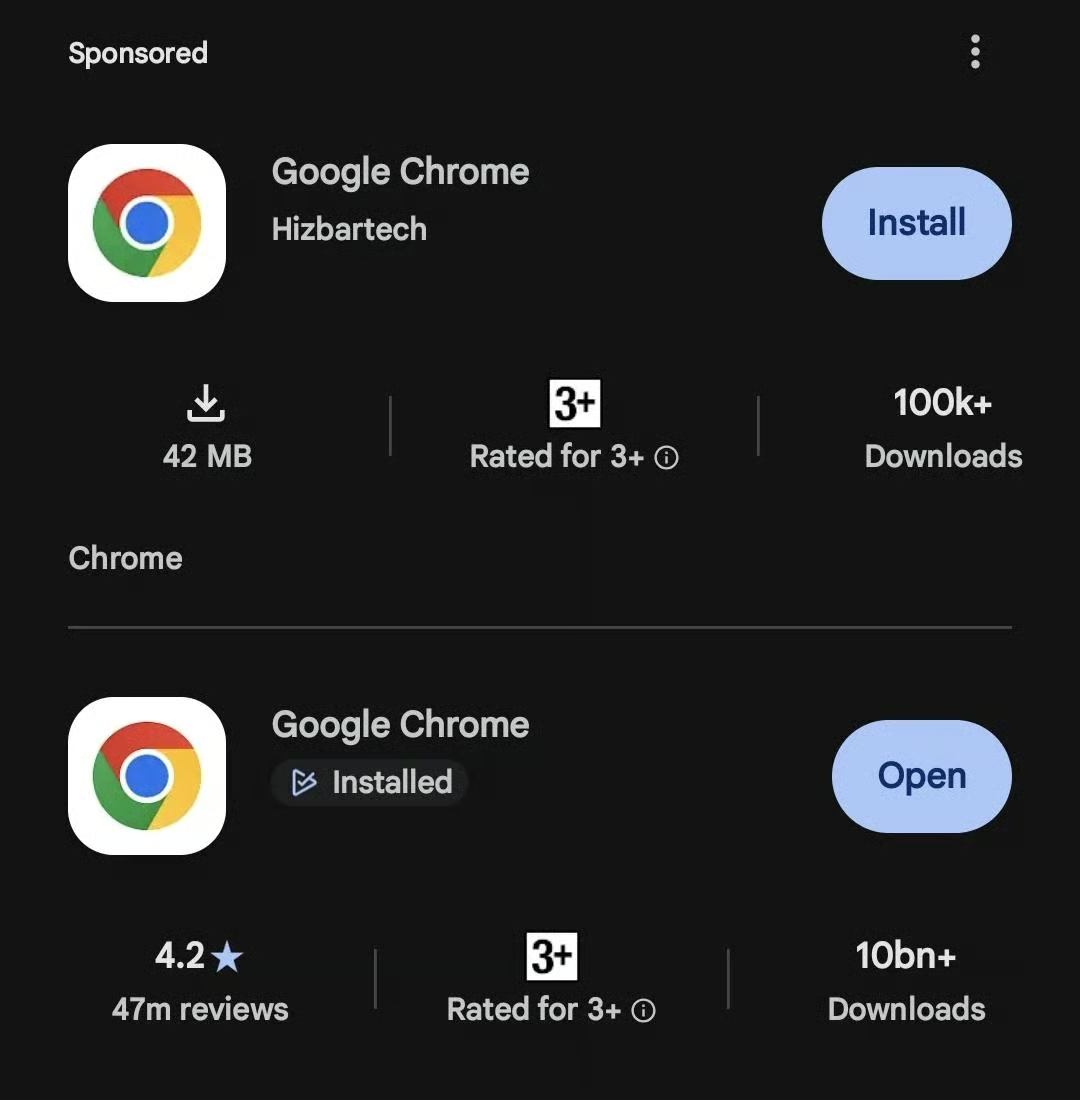
A screenshot shared on Reddit showed the impersonator appearing as a sponsored result above the genuine Chrome app. Image: nikhilchacko/Reddit (r/browsers)
However, while the listing reportedly surpassed 100,000 downloads, the figure is cumulative, so it doesn't show how many downloads the app had before Sept. 30 or how many it gained after the rebranding.
Other Reddit users began investigating the app, and its earlier identity as Ball Bounce emerged. Some speculated that the app was designed to generate advertising revenue rather than infect users with malware, although the developer's intentions remain unclear.
What security teams should check
The incident highlights an app-authenticity problem: a listing can borrow a trusted product’s appearance while identifying a different publisher. The available reporting does not establish whether this app contained mobile malware or stole personal data, and Reddit users’ observations are not a substitute for a security analysis.
For organizations managing Android devices, app approval should include the publisher and application ID alongside the displayed name. Teams should give employees a direct link to an approved listing or distribute the app through a managed catalog, reducing reliance on store searches and sponsored results.
Where mobile device management tools provide application inventories, administrators should check for the reported package identifier, com.ballbounce.Hizbartech. Searching only for the displayed name could overlook an app whose branding has changed.
If the identified impersonator is installed, users should remove it and run a Google Play Protect scan. Employees should also report the installation to IT so the team can review permissions and any unexpected behavior. Further investigation should follow the evidence found on the device; installation alone does not establish that information was stolen.
Key takeaways for users
Official app stores such as Google Play generally offer more protection than downloading apps from unfamiliar websites, thanks to app review processes and security checks. However, as this incident shows, a listing on an official store does not guarantee an app is genuine or accurately represents what it does.
Before installing an app, users should:
- Verify the publisher. Google’s genuine Chrome app is published by Google LLC; the impersonator listed Hizbartech. Follow links from the vendor’s official website rather than relying on branding or download counts alone.
- Check the application ID. Open the Google Play listing in a web browser and look for the identifier after id= in the URL. Google’s standard Chrome app uses com.android.chrome, while the reported impersonator used com.ballbounce.Hizbartech. An update to an existing app must retain its application ID; changing it causes Google Play to treat the upload as a different app.
- Don't trust branding alone. Icons, names, descriptions, and promotional screenshots can be copied. Check whether the app's publisher and official website links match the brand it claims to represent.
- Read user reviews carefully. Look beyond the star rating and download count. Recent reviews describing unexpected behavior, misleading functionality, or suspicious permissions may reveal problems that an overall score hides.
- Be cautious with sponsored results. Paid placement does not establish that an app is genuine.
- Keep Google Play Protect enabled. It periodically scans apps for harmful behavior, including apps installed from outside Google Play, but it should complement — not replace — checks for authenticity.
Ultimately, users do not need to abandon official app stores because of this incident. They should, however, avoid treating a familiar logo, a high download count, or a prominent store placement as complete proof that an app is legitimate.
Read more: Familiar branding can also disguise dangerous installation instructions, as fake Claude Code pages promoted through Google ads demonstrate.