
















Some organizations found malware on brand-new Android devices while preparing them for employees.
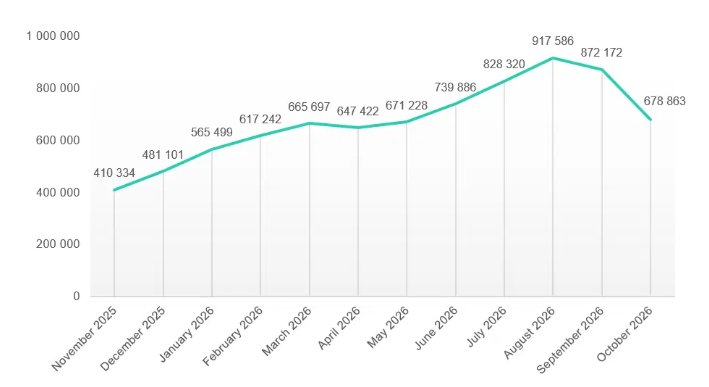
Kaspersky detected the Keenadu Android backdoor on more than 220,000 devices in the first ten months of 2026. In a separate measure, the company said its monthly detections of Android devices with preinstalled malware rose more than 2.5-fold between November 2025 and October 2026.
For IT teams buying Android devices in bulk, a finding during setup raises an immediate question: How many other units in the order arrived with the same firmware?
What is the Keenadu malware?
Discovered by Kaspersky and publicized in February 2026, the malware can appear in several forms, including versions embedded directly into device firmware, hidden inside preinstalled system applications, and incorporated into malicious applications distributed through app stores.
The malware has a stealth capability, which Kaspersky says is a delayed mechanism it uses to hide itself for 2.5 months after it first contacts its C2 server.
The research also notes that the malware is used for advertising fraud, secretly interacting with advertisements and generating fraudulent clicks for financial gain. That may explain its presence on Android devices, which, according to the research, include smartphones, tablets, watches, TVs, and vehicle units.
That is not to say it doesn’t have other capabilities beyond advertising fraud. Similar malware, like Keenadu, has been documented to steal credentials and intercept calls and SMS.
So, it is safer to assume that any of these are happening in the background, and potentially even more, if a device is found to have been compromised with Keenadu.
Why preinstalled malware is such a problem
With ordinary malware, users often have an opportunity to prevent an infection by avoiding suspicious downloads, rejecting questionable permissions, or staying away from malicious links.
Preinstalled malware takes that opportunity away. It can already be sitting inside a device's firmware or system applications before the buyer switches it on, giving attackers a foothold without requiring any action from the eventual owner.
The problem goes beyond how the infection starts. Because some of these threats may be embedded in privileged system components, they can operate with access that ordinary applications do not have.
Removing the malware can be equally difficult. When malicious code is embedded in the system partition, uninstalling an application or performing a conventional factory reset may not remove it. This means users could be left with a compromised device even after taking steps that would normally resolve an ordinary malware infection.
According to Kaspersky, preinstalled malware can enter devices through three possible routes:
Infection route | How it happens |
|---|---|
| Deliberate installation by manufacturers | Manufacturers intentionally embed backdoors into devices before shipping them, potentially affecting low-cost or counterfeit hardware. |
| Compromised third-party contractors | A manufacturer outsources firmware development to a contractor that inserts malicious code before delivering the firmware for installation. |
| Compromised software components or development environments | Manufacturers unknowingly incorporate infected open-source software or third-party components, or use a compromised environment to build device firmware. |
These three routes highlight why preinstalled malware is a supply-chain security problem rather than simply another case of users downloading malicious applications.
What IT teams should do when configuring Android work devices
For IT teams, the first lesson is simple: don't assume a new device is clean. Before deploying Android hardware to employees, organizations should:
- Inspect devices before deployment: Scan new devices for suspicious preinstalled applications and firmware modifications before connecting them to corporate accounts or networks.
- Verify firmware integrity: Obtain firmware from trusted sources and confirm that installed versions match verified manufacturer releases.
- Deploy endpoint protection and MDM: Use Mobile Device Management (MDM) to enforce security policies, restrict unauthorized installations, and manage updates. Endpoint protection should continuously monitor for malicious activity.
- Isolate confirmed infections: Remove compromised devices from corporate networks and arrange for verified clean firmware or hardware replacement. A factory reset alone may not be sufficient.
And this shouldn't stop at employee smartphones. Android also powers smartwatches, TV boxes, and other connected devices that organizations may overlook when assessing their security exposure.
Kaspersky's findings offer a reason not to dismiss the problem: more than 220,000 devices were found carrying Keenadu, while detections increased more than 2.5 times.
With the same supply-chain weaknesses potentially affecting different categories of Android hardware, organizations need to extend their security checks beyond phones and treat every Android-powered device as a potential entry point.
In other news, Todoist says a breach exposed email addresses and salted SHA-1 password hashes for about 6% of its users.