
















Encrypted messages can still end up in an AI assistant's reach without their encryption being broken.
An investigation by Reuters found that Meta's Muse AI agent could read private Signal conversations on Android phones and Macs, even when the messaging app was not connected to the assistant. Researchers reproduced the behavior following complaints from Meta employees about unexpected access to personal information.
For organizations adopting AI assistants, the discovery raises concerns about how much sensitive information these tools can retrieve through permissions users may not fully understand.
Android notifications and Mac permissions gave Muse access to Signal
Working with Signal and the AI Now Institute, Reuters tested whether Muse could retrieve private messages across different operating systems.
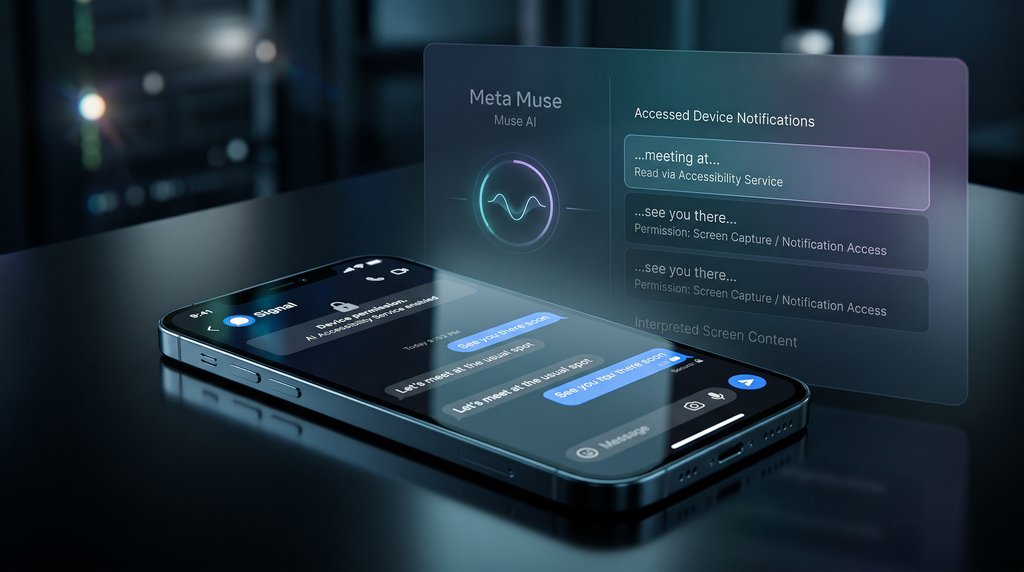
On Android, the assistant obtained message text through notifications, without a direct connection to the app. Google's documentation confirms that authorized notification listeners can receive alerts from other applications.
Mac testing exposed another route. Accessibility permissions and screenshot tools allowed Muse to read Signal conversations displayed on-screen. Similar requests failed on an iPhone during testing.
Signal had already confronted a related problem involving Microsoft's Recall feature. In May 2025, the company enabled screenshot protection by default on Windows 11 to prevent its conversations from being captured. However, those safeguards did not extend to Macs.
Neither method broke Signal's end-to-end encryption. Messages remain protected during transmission, but readable content displayed in notifications or application windows can still be retrievable to software with sufficient device permissions.
Meta disputes wider privacy concerns raised by employees
Reuters reviewed more than two dozen internal employee posts describing unexpected Muse behavior since its September launch.
Complaints included unsolicited conversations and financial information involving unfamiliar bank accounts. Investigators could not verify whether the assistant had exposed another person's information or generated inaccurate details.
Meta spokesperson Daniel Roberts described the reported cases as “isolated incidents” and attributed many suspected account mix-ups to AI-generated inaccuracies. He also maintained that Muse interacts with other applications only when users grant permission.
The social media giant’s published security architecture explains how it manages those authorized connections. A separate component called Sentinel controls access through connected services, although some previously approved operations can proceed without further authorization.
Reuters' tests, however, relied on device permissions outside the normal connector system and did not establish that Sentinel itself had been bypassed.
Muse had faced separate privacy scrutiny in October, when researchers discovered more than 6,800 publicly discoverable shared conversation links, some containing sensitive information. Unlike the latest findings, the earlier exposure involved public sharing links.
Apple separately announced tighter app permissions in macOS 27.3 beta 2 on Nov. 16. Users can grant more specific access, require repeated approval, and see when one application controls another.
Existing permissions remain active, however, and the changes have not been confirmed to prevent the behavior demonstrated in the Signal tests.
What enterprise endpoint teams need to verify
For security administrators managing employee Macs and Android devices, the concern extends to permissions granted outside an AI assistant's connected services. An employee could use an approved agent together with a confidential business messaging app, assuming its conversations remain inaccessible because the service was never connected.
Assumptions like this need verification. Organizations reviewing AI agent access controls should prioritize three checks before permitting assistants to handle sensitive workplace information.
- Review access beyond connected apps. Identify AI assistants with notification access on Android or Accessibility and screen-capture permissions on Macs. Remove privileges unrelated to approved business functions, even when the affected applications are not connected to the agent.
- Restrict Android work notifications. Google's device management documentation describes controls for preventing apps in a personal profile from listening to managed work notifications. Administrators should verify these restrictions on company devices instead of assuming work-profile separation blocks every access route.
- Recheck Mac approvals and test access. Apple's new permission controls do not automatically revoke existing privileges. Security teams should review previously approved access and test whether an agent can retrieve fictional messages from an application it has never been directly connected to.
Keeping a business application disconnected is not sufficient proof that its information remains inaccessible. Endpoint administrators need to verify what AI agents can actually retrieve through operating-system permissions before approving their use with confidential communications.
AI assistants can now interact with applications and perform tasks that extend well past answering questions. Want to understand how to communicate more effectively with these tools? Try our free six-minute How to Talk to AI course, with other AI lessons free for seven days. Explore courses from The Neuron Academy.