
















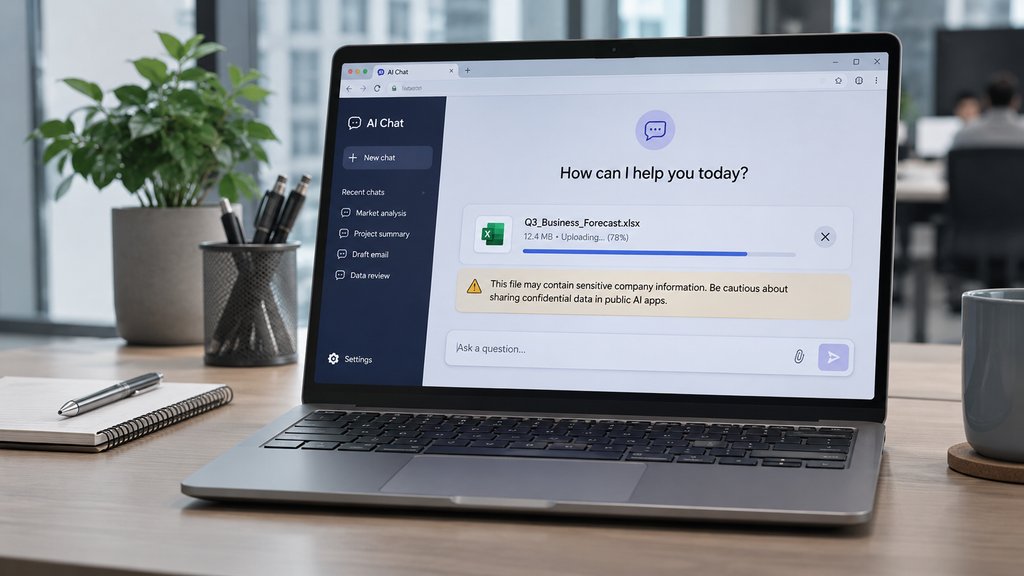
Imagine getting this alert: A customer spreadsheet went into an AI chatbot, and a link to the chat has been shared outside the company.
The security team has two immediate questions. What can a recipient see, and can the team cut off access? The answers depend on what the chat actually displays and who can open the link.
This hypothetical scenario illustrates a security concern for organizations using AI tools. Uploading company data to an external service does not automatically mean someone stole it. Security teams must determine what was shared, identify who could access it, contain the exposure, and assess the potential impact before deciding how to respond.
First, establish what information was exposed
The OWASP Top 10 for LLM Applications identifies sensitive information disclosure as a security risk involving personal data, credentials, and confidential business information.
Before treating a suspected exposure as a confirmed breach, investigators should establish what the available evidence shows.
What security finds | What it confirms | What remains unknown |
|---|---|---|
| An employee uploaded a confidential file to an AI service | The information reached an external provider | How the provider handled the data and whether others could access it |
| A shared conversation link displays confidential information | The information was accessible outside its intended audience | Whether an unauthorized person viewed or copied it |
| Reliable logs show unauthorized access | Someone accessed the information without authorization | Whether they saved or distributed copies |
Security teams may have limited visibility into what employees upload to unapproved AI tools. This makes shadow AI a potential source of sensitive data exposure, even when employees have no intention of putting company information at risk.
Seven steps to investigate and contain AI data exposure
Step 1: Preserve evidence before removing access
Record the AI application's name, the account involved, the shared URL, relevant timestamps, and the affected file. Capture what the link displays and store the evidence in a restricted location.
NIST's incident-response guidance emphasizes coordinated detection, response, and recovery. Security teams should document their findings and preserve evidence needed to investigate the incident.
If confidential information remains publicly accessible, collect essential evidence quickly and revoke the link. Do not delay containment while conducting a lengthy investigation.
Step 2: Trace how the information reached the AI app
Review available endpoint, browser, proxy, cloud security, and data loss prevention (DLP) records to identify who submitted the information and when.
Microsoft's data security investigation guidance explains how investigators can use endpoint DLP evidence and audit records to examine affected files and user activity.
If the AI application connects to company systems, check which accounts and files those integrations could access. Investigators should also identify gaps in their records. A log showing that an employee visited an AI website does not necessarily reveal what they uploaded.
Step 3: Check who could access the conversation
Review the shared link's permissions and inspect the information visible to recipients.
Access rules vary by provider and account type. For example, OpenAI's documentation explains that people with a shared ChatGPT conversation link from a personal account can view its shared content. Managed workspaces have different sharing restrictions.
If a link allows unauthorized users to view confidential information, the data has been exposed. However, the link's existence alone does not prove that an outsider opened or downloaded the content.
Step 4: Contain the exposure and protect credentials
Revoke the shared link and restrict unnecessary access to the affected AI application. Disconnect integrations if they create an ongoing security risk.
If the exposed information includes passwords, API keys, or access tokens, revoke or rotate those credentials promptly. Review related accounts for suspicious activity.
Deleting a conversation or disabling a link can prevent further access, but these actions cannot guarantee that existing copies have disappeared.
Step 5: Contact the AI provider about data handling
Ask the provider whether it retains the submitted information and how it handles deletion requests.
Request details about data retention, available access records, and whether the account's settings permit the provider to use submitted content for model improvement.
Document the provider's response and any confirmed deletion or access restrictions. If the provider cannot establish whether others accessed or retained the information, record that uncertainty.
Step 6: Determine whether breach notification is required
Involve legal, privacy, and compliance teams when the exposed information includes personal data, customer records, or regulated information.
Reporting obligations depend on the applicable law, the type of information involved, and the potential harm to affected individuals. For example, the UK's Information Commissioner's Office requires organizations to report certain personal data breaches without undue delay and, where feasible, within 72 hours of becoming aware of them.
Not every unauthorized AI upload requires regulatory notification. However, organizations should document their assessment and avoid delaying a required report simply because the investigation remains incomplete.
Step 7: Strengthen security controls and test them
Review which AI applications employees can use and what information they may submit. Apply data classification rules, restrict unnecessary integrations, and provide approved alternatives.
Microsoft recommends DLP controls that restrict sensitive information from being pasted or uploaded to AI applications. Security teams should test these restrictions to confirm they work as intended.
Even established controls can fail. In an earlier incident, eSecurity Planet reported a Microsoft 365 Copilot bug that circumvented DLP restrictions, allowing the assistant to summarize confidential emails despite existing protections. Microsoft said the issue did not grant users access to information they were not already authorized to see.
What security teams should confirm before closing the incident
Before closing an investigation, security teams should confirm what information left the company, who could access it, which containment measures they completed, and what remains unverified.
The final report should document any outstanding provider requests, affected credentials, and security changes introduced to prevent another incident.
A lack of evidence showing unauthorized access does not prove that nobody accessed the information. Investigators should distinguish confirmed findings from unresolved questions rather than assume the data was stolen or completely recovered.
Deleting a shared conversation may stop further access, but it does not resolve the underlying security problem. Organizations must also understand how the information reached the AI service and strengthen the controls that should have protected it.
Also read: For additional guidance on restricting AI access to sensitive business systems, review eSecurity Planet's AI Agent Safety Checklist.