
















An account intended for SSH-key access could still let an attacker in through its password login.
That contradiction is at the heart of SSHole, a newly discovered OpenSSH vulnerability that lets attackers bypass authentication on certain Linux systems without knowing a victim's password or having their SSH private key.
The flaw exploits an unexpected interaction between OpenSSH and musl, a lightweight C standard library used by Alpine Linux, turning a failed password-hashing operation into a successful login.
Ars Technica reports that Alpine’s Docker Hub base image has exceeded a billion downloads. That figure does not establish how many systems are vulnerable; exploitation requires a specific combination of software, settings, and account configurations.
OpenSSH has released a fix, but administrators must install it and restart the SSH service. Systems with limited maintenance windows may require immediate mitigation while teams arrange an update.
What's needed to run a successful SSHole exploit
Successful exploitation requires a specific combination of software, authentication settings, and account configurations.
First, the target must run OpenSSH with musl libc without Pluggable Authentication Modules (PAM) handling authentication. Password-based SSH authentication must also be enabled, allowing attackers to submit passwords through the affected authentication mechanism.
Exploitation also requires two account conditions:
- The target account must have an asterisk (*) in its /etc/shadow password field, indicating that ordinary password authentication should be unavailable.
- Another local account must have a usable SHA-256 or SHA-512 password hash, from which OpenSSH can borrow a salt during verification.
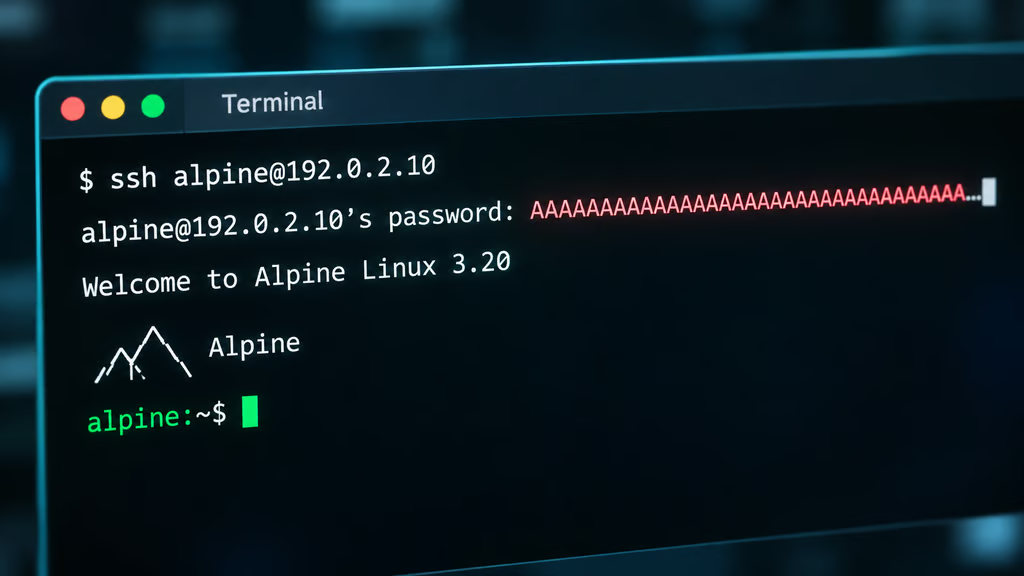
According to Alpine, an attacker who knows the affected account’s username and can reach the SSH service can exploit a system meeting these conditions. They can subsequently submit a password between 257 and 1,024 bytes long.
Musl's crypt() function would typically reject the input because it exceeds the library's 256-byte limit. However, instead of returning a valid password hash, the function returns an asterisk (*) to indicate that hashing failed.
OpenSSH then compares this result against the target account's stored password field, which also contains an asterisk. The two values match, and OpenSSH mistakenly interprets the failed hashing operation as successful authentication, granting the attacker access to the account without its password or SSH private key.
How longstanding software behaviors created a login bypass
Perhaps the most unsettling thing about SSHole isn't just that it lets attackers bypass authentication, but how long the conditions that made it possible went unnoticed.
The vulnerability emerged from software behaviors dating back years. In other words, individual components behaved as designed, but their interaction produced a security failure that went undetected for years.
The PHP2Shell response similarly highlights why security teams must verify running fixes and investigate earlier access. Meanwhile, services offering AI-assisted vulnerability scans are expanding efforts to find overlooked flaws.
For security teams, the practical lesson is to test how authentication components interact, including the failure paths that routine login checks may miss.
For years, security assessments, code reviews, and penetration tests have helped organizations identify weaknesses, but they cannot guarantee they've found every possible failure. Recent advances in AI-assisted vulnerability research are making that limitation harder to ignore, as flaws that survived years of scrutiny are now being examined in ways that can expose previously overlooked paths to exploitation.
Internet-facing SSH services deserve particular attention because attackers can reach them remotely.
As Jake Knott, head of threat intelligence at watchTowr, explains, “SSH is on just about everything and is often public-facing for server management, but the prerequisites mean many systems won't be affected.”
Still, those requirements give attackers identifiable configurations to look for. Knott points to “Alpine’s AWS and Azure images” as “likely what we’ll see targeted first.” Alpine clarifies that affected tiny-cloud images are safe on first boot but become exploitable when a qualifying password hash is added.
Active exploitation of separate MikroTik SSH flaws illustrates the risks facing exposed management services. Knott warned that existing password-guessing operations could also incorporate SSHole attempts. As Knott puts it, “exploiting this vulnerability simply means those same attackers add a very long password attempt to that brute-force list.”
“We'd be extremely surprised if we didn't see SSH brute-forcers attempting this by the weekend. It's virtually free to try and an easy win if it works,” he added.
Patch the service and investigate earlier access
OpenSSH released version 10.6p2 on Nov. 5 to address the bypass. Alpine also provides patched packages for older branches, so administrators should check their distribution’s advisory rather than rely solely on the upstream version number.
Security teams should prioritize three steps:
- Confirm exposure: Check whether the system uses musl, password authentication is enabled, PAM is not handling authentication, and the required account conditions exist.
- Apply the fix: Install the appropriate patched package and restart sshd. Updating the package alone does not replace the running daemon.
- Mitigate when necessary: First verify that SSH-key access works. Then set PasswordAuthentication no, validate the configuration, and restart sshd. Keep the existing administrative session open until a new key-based login succeeds.
Review earlier activity as well. Alpine recommends checking /var/log/messages for successful password logins to accounts that have no password. Investigate unexpected privilege escalation, newly created users, and changes to authorized keys.
A successful update closes this authentication bypass; it does not establish whether attackers accessed the system beforehand. Suspicious logins should trigger an incident investigation.
The broader lesson is to verify the server’s actual authentication policy. Using SSH keys does not automatically disable password login, and an account intended for key-based access can remain exposed through an enabled alternative.
Read more: Learn how to detect and remove CWPdoor malware, including the warning signs and recovery steps Linux server administrators should check.