

















Secure cybersecurity tools help businesses work more efficiently by safeguarding conversations, protecting sensitive files, and ensuring compliance.
For remote teams, secure tools are even more essential. When employees are located across different regions, the risk of data breaches, unauthorized access, and miscommunication increases significantly.
To help you find the right fit, I evaluated top security tools built to protect remote teams. I compared their features, pricing, pros and cons, and ideal use cases to help you choose the best option for your organization’s needs.
Here are my top picks for the best secure options to safeguard remote teams in 2025:
- Malwarebytes: Helps solo or small remote teams stay secure without heavy IT infrastructure.
- Norton: Great for protecting laptops, phones, and tablets across locations.
- McAfee: Best for endpoint security for small teams
- PC Matic: Great for security-conscious SMBs or industries with strict compliance needs.
- EXTRA SAFE: Ideal for teams seeking a no-footprint alternative to Zoom or Slack.
Top security tools that enable safe remote collaboration
Choosing the right security tool for remote or hybrid environments depends on the specific needs of your team and organization, including security requirements, compliance obligations, deployment preferences, and budget constraints.
The table below provides a quick overview of the leading tools, highlighting their core strengths and ideal use cases:
| Best for | Key features | Deployment type | Starting price (Billed annually) | |
|---|---|---|---|---|
| Malwarebytes | Multi-layer malware defense | Real-time threat monitoringScam and ransomware blocking | Hybrid | $119.99 |
| Norton | Multi-device protection | Secure VPN Password manager | Hybrid | $1.25 per month |
| McAfee | Endpoint security for small teams and professionals | Real-time antivirusFile encryption | Hybrid | $29.99 |
| PC Matic | Zero-trust endpoint security and compliance | Application whitelistingCompliance alignment | Hybrid | $150 |
| EXTRA SAFE | Peer-to-peer encrypted communications | Peer-to-peer encryptionEphemeral communications | Cloud-based | Free to use |
Overall, I picked Malwarebytes as the top tool for securing remote collaboration, thanks to its strong core features and ease of use. Continue reading to learn more about each tool’s use case, pricing, and key features, or skip ahead to see my scoring logic.

Malwarebytes
Remote benefit: Helps solo or small remote teams stay secure without heavy IT infrastructure.
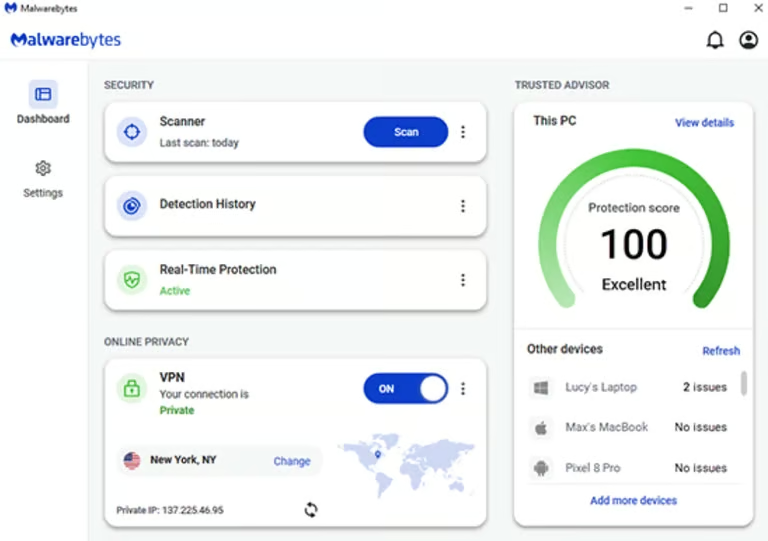
Malwarebytes provides comprehensive tools to secure your devices, including antivirus, anti-malware, privacy protection, and scam protection. If you’re a sole proprietor facilitating a small team, managing a small office, or a boutique business with fewer employees, you can purchase Malware Team plans. If your organization has more than 20 employees, there are options associated with the ThreatDown product.
The platform excels in its AI-powered, multi-vector malware protection combined with easy deployment and centralized management. It combines various technologies to provide comprehensive protection against threats, including real-time protection, behavior-based analysis, anomaly detection, and signature-based scanning.
Pros
- High success rate in malware detection
- Intuitive interface with fast remediation
- Priority, round-the-clock expert support
Cons
- Lacks a built-in firewall and advanced AI tools
- Has inconsistent third-party test results
- Can slow down system performance at times
Interface
Pricing
- Teams sole proprietor: Starts at $119.99 billed annually
- Teams boutique business: Starts at $399.99 billed annually
- Teams small office: Starts at $519.99 billed annually
Key Features
- Multi-layered protection against malware, viruses, spyware, and ransomware
- Always-on defense, including brute-force attack prevention
- Scam and ransomware protection
- Intuitive dashboard for easy performance optimization

Norton
Remote benefit: Great for protecting laptops, phones, and tablets across locations.
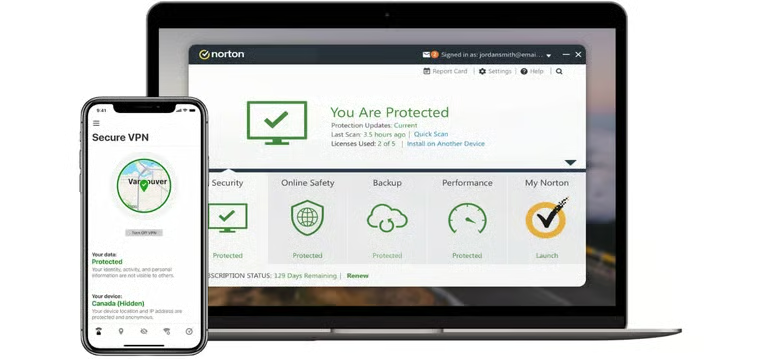
Norton 360 offers comprehensive protection, including device security features such as antivirus and a password manager, all in one single solution. It safeguards and provides comprehensive malware protection for up to five PCs, Macs, Androids, or iOS devices. It also features parental control to help you protect your children online by managing their activities on their PCs or smartphones.
Additionally, its integrated VPN, password manager, and dark web monitoring capabilities make it a versatile solution for small businesses and remote teams seeking comprehensive protection and privacy.
Pros
- Supports multiple devices and platforms
- Integrated password manager and cloud backup
- User-friendly interface with parental controls and dark web monitoring
Cons
- Prices can increase significantly after the first year
- Several features require a learning curve
Interface
Pricing
- AntiVirus Plus: $29.99 billed annually for the first year; $59.99 billed annually
- Standard: $39.99 billed annually for the first year; $94.99 billed annually
- Deluxe: $49.99 billed annually for the first year; $119.99 billed annually
- Select: $99.99 billed annually for the first year; $189.99 billed annually
Key Features
- Real-time threat protection with advanced antivirus and firewall
- Secure VPN for anonymous, encrypted browsing
- Password manager for secure storage and generation of credentials
- PC cloud backup and parental controls for added data and family protection

McAfee
Remote benefit: Ideal for small teams and freelancers needing broad protection without an IT department.
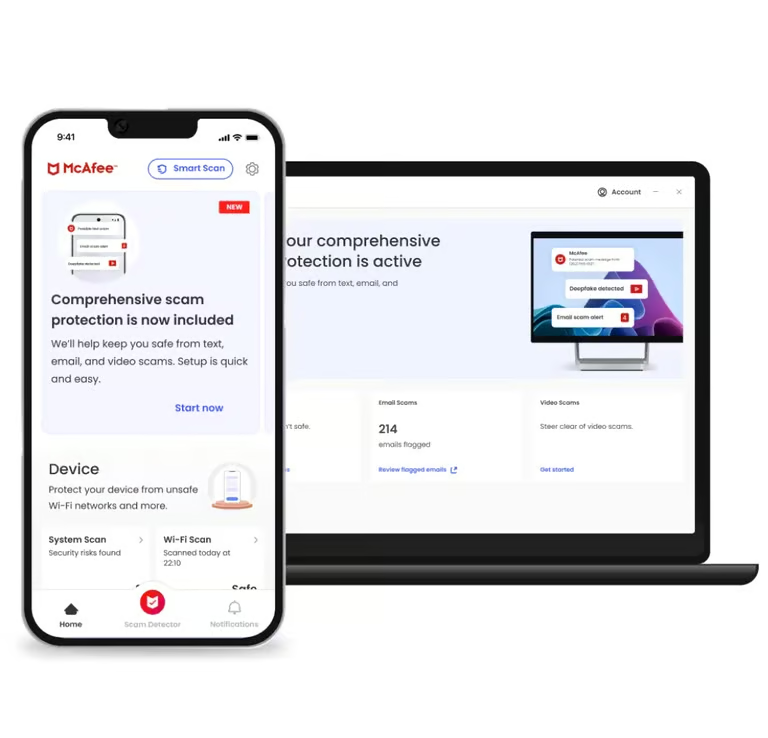
McAfee delivers all-in-one protection across devices with antivirus, firewall, VPN, password management, and file encryption. It’s ideal for small businesses and freelancers seeking robust security without complex setup or steep learning curves.
Pros
- Award-winning malware detection and removal
- User-friendly interface suitable for non-technical users
- Cross-platform compatibility for Windows, macOS, and more
Cons
- Tendency to slow down lower-spec PCs
- Limited identity protection features
- VPN and some features vary by subscription plan
Interface
Pricing
- Basic: $29.99 billed annually
- Essential: $39.99 billed annually
- Premium: $49.99 billed annually
- Advanced: $89.99 billed annually
- Ultimate: $199.99 per year
The pricing above is McAfee’s introductory rate for the first year only. For the complete pricing details, refer to McAfee’s official pricing page.
Key Features
- Real-time antivirus and anti-ransomware protection
- Secure VPN for encrypted internet access
- Intelligent firewall and phishing protection
- Password manager and sensitive file encryption

PC Matic
Remote benefit: Great for security-conscious SMBs or industries with strict compliance needs.
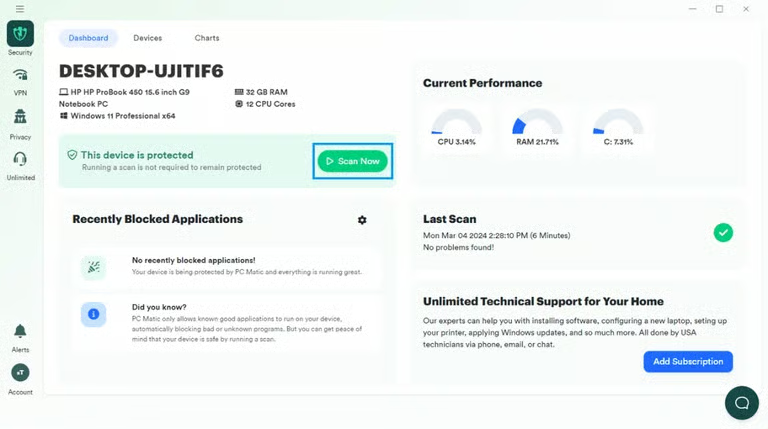
PC Matic uses a zero-trust model with application whitelisting to ensure only verified users and apps gain access. With multi-OS support and centralized management, it’s ideal for organizations needing tight endpoint control and regulatory compliance.
Pros
- Highly effective at blocking unknown threats through zero-trust whitelisting
- Supports multiple platforms, including Windows, Mac, Linux, iOS, and Android
- Centralized dashboard for compliance and endpoint security management
Cons
- Requires ongoing IT support for application whitelisting
- May block legitimate applications if not properly configured
Interface
Pricing
- Pro: Starts at $150 for up to five devices, billed annually
- SMB: Starts at $150 for up to five devices, billed annually
Key Features
- Zero-trust application whitelisting for endpoint protection
- Real-time monitoring and remote management across multiple platforms
- Script enforcement for fileless malware defense
- Built-in VPN, dark web monitoring, and identity protection

EXTRA SAFE
Remote benefit: Ideal for teams seeking a no-footprint alternative to Zoom or Slack.
EXTRA SAFE is a free, privacy-first collaboration tool offering peer-to-peer encrypted messaging and video calls with no data stored on servers. It uses blockchain encryption and deletes all session data after each call for total privacy.
While it doesn’t offer traditional endpoint protection, it serves as a strong complement to other tools on this list for teams that prioritize secure, no-trace communication.
Pros
- Peer-to-peer architecture eliminates data storage on servers
- No account creation or personal information required
- Blockchain-level encryption for sensitive communications
Cons
- May lack advanced collaboration features
- Adoption might have a learning curve for larger teams
Interface

Pricing
- Free to use
Key Features
- Ephemeral communications with no data stored on servers
- Designed for highly sensitive, confidential business discussions
- P2P video calls and encrypted messaging without third-party servers
- Secure free screen sharing for collaboration and presentation
How I evaluated the best tools for securing remote collaboration
To determine the best secure solutions, I assessed each tool across four categories: core features, advanced features, cost, and ease of use. From there, I divided each category into weighted subcriteria and assigned an overall score out of five to determine the winner for each category.
- Core Features (45 percent): Robust, secure tools for remote teams include capabilities such as data privacy, encryption, safe browsing, data loss prevention, and mobile app support. Potential users should research the feature sets of each tool before making a purchase.
Criteria Winner: Malwarebytes
- Advanced features (25 percent): The best secure enterprise collaboration tools go beyond basic protection and offer advanced capabilities to enhance the security and privacy of remote teams.
Criteria Winner: McAfee
- Cost (15 percent): I analyzed each platform’s free plan, the length of free trials for paid versions, and the starting price for upgrades.
Criteria Winner: EXTRA SAFE
- Ease of Use (15 percent): A platform’s usability affects how easily you can navigate and maximize its features. Here, I evaluated the user interface design and user experience of each secure collaboration tool.
Criteria Winner: Malwarebytes and EXTRA SAFE
Bottom line: The best tools for secure collaboration
As remote and hybrid work have become popular in recent years, securing your team’s devices and communication channels is more critical than ever.
Whether you need robust endpoint protection, encrypted messaging, or privacy-first collaboration, the tools in this list offer flexible, security-focused solutions that can adapt to your organization’s unique needs.